Challenge Response Login
Logging into Passwords
In Passwords, the traditional login method of entering a username and password is unnecessary. All sensitive data is encrypted with one or more GPG keys, and possession of the correct private key—along with its passphrase—is all that is required to decrypt and use a password entry. If your key can decrypt an item, you are authorized to access it.
This cryptographic model eliminates the need for server‑side authentication. The system does not verify who you claim to be; it simply verifies whether your key can unlock the encrypted data.
However, this alone does not prevent users from browsing the password tree. Even without the ability to decrypt entries, a user could still see:
- Folder names
- Entry names
- The overall structure of the password store
In some environments, even this level of visibility is too permissive.
To address this, Passwords provides a challenge–response system. Before allowing a user to browse or interact with the password tree, the system issues a cryptographic challenge. Only users who can successfully respond using a valid private key are granted access.
This ensures that:
- Users without authorized keys cannot browse the password tree
- Sensitive structural information remains hidden
- Access is restricted at both the metadata and content levels
The combination of key‑based decryption and challenge–response access control provides a flexible security model suitable for both open and highly restricted environments.
How does Challenge Response work in Passwords
- Enable the Feature
- Go to Database → Preferences.
- On the General tab, tick the checkbox Require Challenge before login.
- Login Process
- When Challenge Response is enabled, users must select their GPG key.
- Passwords will generate and present encrypted information using the chosen key.
- The user must decrypt this data externally (outside of Passwords).
- Once decrypted, the plaintext response is revealed.
- The user provides this response back to Passwords to proceed with login.
Security Design
- Passwords only stores a hash of the response, not the actual response itself.
- This ensures the application has no knowledge of the original response, strengthening security and reducing risk of compromise.
- Passwords will close after three wrong responses.
- When Passwords is accessible to more than one user, the setting is configured on a per‑user basis.
Example Process
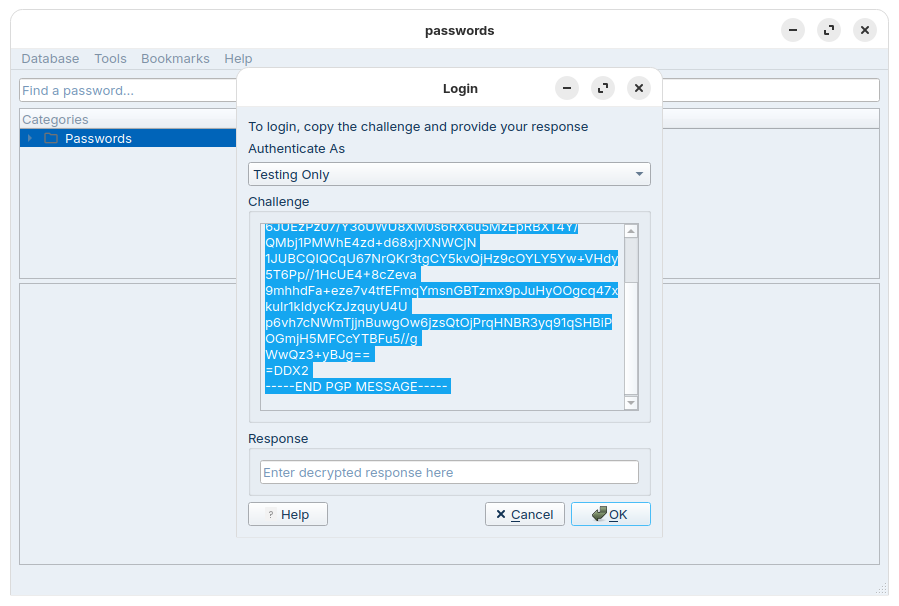
$ gpg -d
-----BEGIN PGP MESSAGE-----

hF4DbRyawwndZi0SAQdAzsxfS9pxwJ8SYb4S9Fr3o8H5DQhIpO3bTflyQDTBlFQw
6JUEzPz07/Y3oUWU8XM0s6RX6u5MzEpRBXT4Y/QMbj1PMWhE4zd+d68xjrXNWCjN
1JUBCQIQCqU67NrQKr3tgCY5kvQjHz9cOYLY5Yw+VHdy5T6Pp//1HcUE4+8cZeva
9mhhdFa+eze7v4tfEFmqYmsnGBTzmx9pJuHyOOgcq47xkuIr1kIdycKzJzquyU4U
p6vh7cNWmTjjnBuwgOw6jzsQtOjPrqHNBR3yq91qSHBiPOGmjH5MFCcYTBFu5//g
WwQz3+yBJg==
=DDX2
-----END PGP MESSAGE-----
gpg: encrypted with cv25519 key, ID 6D1C9AC309DD662D, created 2025-11-10
      "Test"

Your Response to login is:
Ship3-Puts-Walk
Run the gpg -d command, paste the challenge text, then press CTRL+D to end input. When prompted, enter the passphrase for your GPG key.